실습> 가상호스트 설정하기
가상호스트 : 하나의 서버에서 여러 도메인을 운영할 수 있는 기능이다.
가상호스트는 2가지 종류가 있다.
첫 번째 : IP 기반의 가상호스트
- 여러 개의 IP주소가 필요하고 그 IP주소들에 각 도메인들을 매핑시킨다.
두 번째 : 이름 기반의 가상호스트
- 하나의 IP주소만 있으면 그 IP주소에 각 도메인들을 매핑시킨다.
- HTTP message 에서 Header 부분에 Host: 도메인주소 에 의해서 결정된다.
모듈 : vhost_alias_module
모듈의 위치 : /lib64/httpd/modules/mod_vhost_alias.so
설정파일 : /etc/httpd/conf.modules.d/00-base.conf
LoadModule vhost_alias_module modules/mod_vhost_alias.so
-- 조건 --
웹서버 설정 정보
도메인 사용자 웹페이지 경로 디폴트 웹 문서 IP 주소
sbs.com sbsuser /home/sbsuser/public_html index.php 192.168.108.3
kbs.com kbsuser /home/kbsuser/public_html index.php 192.168.108.3
mbc.com mbcuser /home/mbcuser/public_html index.php 192.168.108.3
-- 조건 --
-- 실습 순서 --
1. 도메인 설정
2. 사용자 생성
3. 기본 문서 생성
4. SELinux 설정
5. 가상호스트 설정
6. 웹서버 재시작
7. 도메인 접근
-- 실습 순서 --
1. 도메인 설정
DNS(Domain Name System)로 하지 않고 가짜로 설정한다.
DNS : 도메인주소 -> IP주소 변환
/etc/hosts 파일이 DNS보다 우선순위를 먼저한다.
# vi /etc/hosts
127.0.0.1 localhost localhost.localdomain localhost4 localhost4.localdomain4
::1 localhost localhost.localdomain localhost6 localhost6.localdomain6
192.168.108.3 firewall.linuxmaster.net
192.168.108.3 www.sbs.com sbs.com
192.168.108.3 www.kbs.com kbs.com
192.168.108.3 www.mbc.com mbc.com
설정된 도메인으로 통신이 잘 되는지 확인한다.
# ping www.sbs.com
# ping www.kbs.com
# ping www.mbc.com
2. 사용자 생성
/etc/skel : 사용자 생성 시 복사되는 뼈대 디렉터리
# mkdir -m 711 /etc/skel/public_html
# useradd -g users sbsuser
# passwd sbsuser
# useradd -g users kbsuser
# passwd kbsuser
# useradd -g users mbcuser
# passwd mbcuser
3. 기본 문서 생성
각 사용자의 홈디렉터리의 권한을 701로 설정한다.
# chmod -c o+x /home/{sbs,kbs,mbc}user
sbsuser 사용자 로그인한다.
login as: sbsuser
sbsuser@192.168.108.3's password:
$ cd public_html
$ vi index.html
<html>
<head>
<meta charset="utf8">
<title> ::: sbs.com ::: </title>
</head>
<body>
<center> sbs.com 에 오신 것을 환영합니다. </center>
</body>
</html>
kbsuser로 로그인한다.
login as: kbsuser
kbsuser@192.168.108.3's password:
$ cd public_html
$ vi index.html
<html>
<head>
<meta charset="utf8">
<title> ::: kbs.com ::: </title>
</head>
<body>
<center> kbs.com 에 오신 것을 환영합니다. </center>
</body>
</html>
mbcuser로 로그인한다.
login as: mbcuser
mbcuser@192.168.108.3's password:
$ cd public_html
$ vi index.html
<html>
<head>
<meta charset="utf8">
<title> ::: mbc.com ::: </title>
</head>
<body>
<center> mbc.com 에 오신 것을 환영합니다. </center>
</body>
</html>
4. SELinux 설정
# sestatus
SELinux status: enabled
SELinuxfs mount: /sys/fs/selinux
SELinux root directory: /etc/selinux
Loaded policy name: targeted
Current mode: enforcing
Mode from config file: enforcing
Policy MLS status: enabled
Policy deny_unknown status: allowed
Max kernel policy version: 31
SELinux를 변경한다.
# chcon -R -t httpd_sys_content_t ~sbsuser/public_html
# chcon -R -t httpd_sys_content_t ~kbsuser/public_html
# chcon -R -t httpd_sys_content_t ~mbcuser/public_html
5. 가상호스트 설정
가상호스트 : 하나의 서버에서 여러 도메인을 운영할 수 있는 기능이다.
가상 도메인 설정 형식
<VirtualHost *:80>
ServerAdmin 관리자 이메일 주소
DocumentRoot 웹페이지가 제공되는 경로 (절대경로)
ServerName 도메인 주소
ServerAlias 도메인 주소
ErrorLog 웹페이지 접근 시에 에러 로그가 기록되는 경로
CustomLog 웹페이지 접근 시에 정상/에러 로그가 기록되는 경로
</VirtualHost>
# vi /etc/httpd/conf/httpd.conf
:
: (생략)
###########
# sbs.com #
###########
<VirtualHost *:80>
ServerAdmin webmaster@sbs.com
DocumentRoot /home/sbsuser/public_html
ServerName sbs.com
ServerAlias www.sbs.com
ErrorLog logs/sbs.com-error_log
CustomLog logs/sbs.com-access_log common
</VirtualHost>
###########
# kbs.com #
###########
<VirtualHost *:80>
ServerAdmin webmaster@kbs.com
DocumentRoot /home/kbsuser/public_html
ServerName kbs.com
ServerAlias www.kbs.com
ErrorLog logs/kbs.com-error_log
CustomLog logs/kbs.com-access_log common
</VirtualHost>
###########
# mbc.com #
###########
<VirtualHost *:80>
ServerAdmin webmaster@mbc.com
DocumentRoot /home/mbcuser/public_html
ServerName mbc.com
ServerAlias www.mbc.com
ErrorLog logs/mbc.com-error_log
CustomLog logs/mbc.com-access_log common
</VirtualHost>
6. 웹서버 재시작
설정이 완료되면 설정파일의 문법을 체크해서 Syntax OK 메세지가 나오면
설정파일에 정상적으로 설정이 완료된 것이다. 이때 아파치 웹서버를 재시작한다.
/usr/sbin/httpd : 아파치 웹서버 데몬
httpd -t : 설정파일 문법 검사
# httpd -t
Syntax OK
# systemctl restart httpd
httpd -S : 현재 설정된 가상호스트와 여러 정보를 출력한다.
# httpd -S
VirtualHost configuration:
*:80 is a NameVirtualHost
default server sbs.com (/etc/httpd/conf/httpd.conf:358)
port 80 namevhost sbs.com (/etc/httpd/conf/httpd.conf:358)
alias www.sbs.com
port 80 namevhost kbs.com (/etc/httpd/conf/httpd.conf:370)
alias www.kbs.com
port 80 namevhost mbc.com (/etc/httpd/conf/httpd.conf:382)
alias www.mbc.com
ServerRoot: "/etc/httpd"
Main DocumentRoot: "/var/www/html"
Main ErrorLog: "/etc/httpd/logs/error_log"
Mutex proxy: using_defaults
Mutex authn-socache: using_defaults
Mutex default: dir="/run/httpd/" mechanism=default
Mutex mpm-accept: using_defaults
Mutex authdigest-opaque: using_defaults
Mutex proxy-balancer-shm: using_defaults
Mutex rewrite-map: using_defaults
Mutex authdigest-client: using_defaults
PidFile: "/run/httpd/httpd.pid"
Define: _RH_HAS_HTTPPROTOCOLOPTIONS
Define: DUMP_VHOSTS
Define: DUMP_RUN_CFG
User: name="apache" id=48
Group: name="apache" id=48
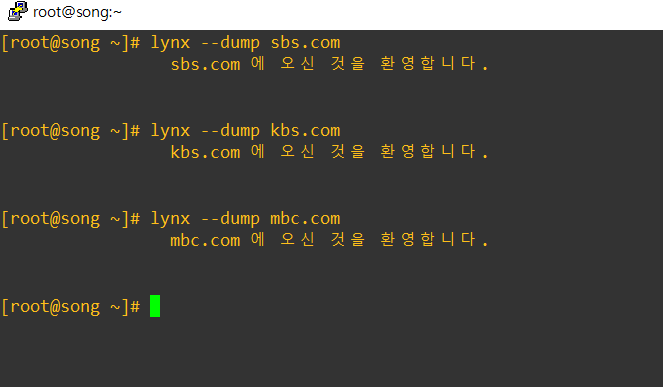
7. 도메인 접근
lynx : 텍스트용 웹브라우저
# yum -y install mc
# lynx --dump sbs.com
sbs.com 에 오신 것을 환영합니다.
# lynx --dump kbs.com
kbs.com 에 오신 것을 환영합니다.
# lynx --dump mbc.com
mbc.com 에 오신 것을 환영합니다.
'Linux > Linux 실습' 카테고리의 다른 글
| [Linux] 조건에 맞는 이름 기반의 가상 호스트 생성 (0) | 2021.11.09 |
|---|---|
| [Linux] 가상 호스트 문제점 해결 (0) | 2021.11.09 |
| [Linux] HTTP Method 정리 : GET/POST 방식 (0) | 2021.11.09 |
| 사용자 크론(Cron) 생성/제거 (0) | 2021.11.06 |
| yum 프로세스 강제 종료 (0) | 2021.11.06 |