실습> 라우터 이중화 VRRP 설정하기
VRRP(Virtual Router Redundancy Protocol)는 RFC Standard 2338에 정의된 표준 프로토콜이다.
HSRP는 Cisco 에서 개발되어 Cisco만 지원하지만 VRRP는 모든 Vendor에서 지원되는 IEEE에서 표준으로 제정한 Protocol 이다.
VRRP는 라우터를 이중화하는 기술로
여러 대 (최소 2대 이상)의 Router를 하나의 group으로 묶어서
Client의 Gateway에 대한 IP Address를 공유하고 Priority가 높은 Router가 Master로 설정되고 Gateway로 동작하다가
Master Router에 장애가 발생하면
그 다음 Priority의 높은 값을 가진 Backup Router가 Master를 넘겨 받아 변경되어 Gateway로 동작한다.
그러므로 Client는 장애없이 통신을 유지 할 수 있다.
특징
Multicast 주소: 224.0.0.8
hello time: 1초, hold time: 3초
주: master, 보조: backup
VRRP 상태변화
Init: 이중화 동작의 준비 상태
Backup: init 다음 상태 또는 보조 장비 상태
Master: 주 장비 역할을 수행하는 상태
파일명: vrrp.gns
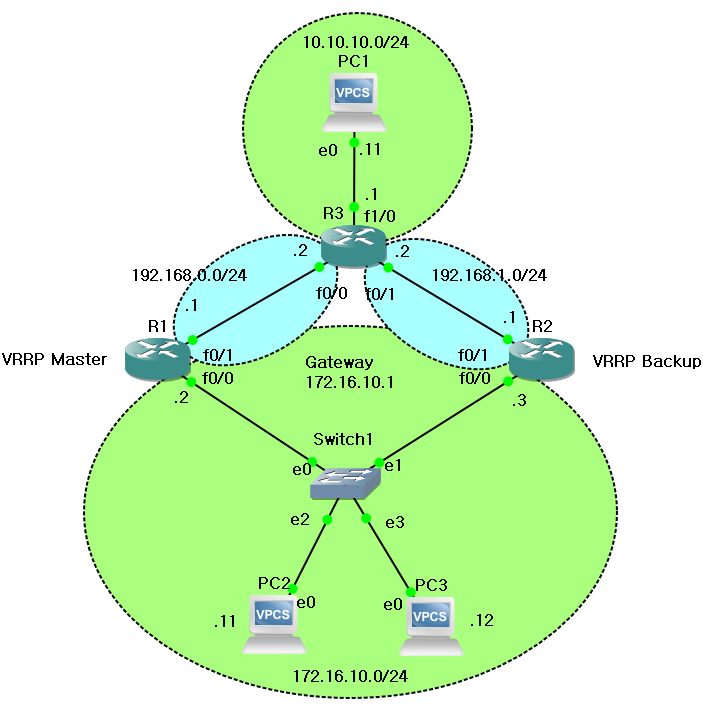


1. PC 설정
PC1> ip 10.10.10.11 255.255.255.0 10.10.10.1
Checking for duplicate address...
PC1 : 10.10.10.11 255.255.255.0 gateway 10.10.10.1
PC1> sh ip
NAME : PC1[1]
IP/MASK : 10.10.10.11/24
GATEWAY : 10.10.10.1
DNS :
MAC : 00:50:79:66:68:00
LPORT : 10028
RHOST:PORT : 127.0.0.1:10029
MTU: : 1500
PC2> ip 172.16.10.11 255.255.255.0 172.16.10.1
Checking for duplicate address...
PC1 : 172.16.10.11 255.255.255.0 gateway 172.16.10.1
PC2> sh ip
NAME : PC2[1]
IP/MASK : 172.16.10.11/24
GATEWAY : 172.16.10.1
DNS :
MAC : 00:50:79:66:68:01
LPORT : 10030
RHOST:PORT : 127.0.0.1:10031
MTU: : 1500
PC3> ip 172.16.10.12 255.255.255.0 172.16.10.1
Checking for duplicate address...
PC1 : 172.16.10.12 255.255.255.0 gateway 172.16.10.1
PC3> sh ip
NAME : PC3[1]
IP/MASK : 172.16.10.12/24
GATEWAY : 172.16.10.1
DNS :
MAC : 00:50:79:66:68:02
LPORT : 10032
RHOST:PORT : 127.0.0.1:10033
MTU: : 1500
2. R3 설정
conf t
int fa0/0
ip add 192.168.0.2 255.255.255.0
no sh
do sh run int fa0/0
!
int fa0/1
ip addr 192.168.1.2 255.255.255.0
no sh run int fa0/1
!
int fa1/0
ip add 10.10.10.1 255.255.255.0
no sh run int fa1/0
end
!
R3#sh ip int b
Interface IP-Address OK? Method Status Protocol
FastEthernet0/0 192.168.0.2 YES manual up up
Serial0/0 unassigned YES unset administratively down down
FastEthernet0/1 192.168.1.2 YES manual up up
Serial0/1 unassigned YES unset administratively down down
Serial0/2 unassigned YES unset administratively down down
Serial0/3 unassigned YES unset administratively down down
FastEthernet1/0 10.10.10.1 YES manual up up
FastEthernet2/0 unassigned YES unset administratively down down
FastEthernet3/0 unassigned YES unset administratively down down
FastEthernet4/0 unassigned YES unset administratively down down
라우팅 설정
!
conf t
ip route 172.16.10.0 255.255.255.0 192.168.0.1
ip route 172.16.10.0 255.255.255.0 192.168.1.1
end
!
R3#sh ip route
Codes: C - connected, S - static, R - RIP, M - mobile, B - BGP
D - EIGRP, EX - EIGRP external, O - OSPF, IA - OSPF inter area
N1 - OSPF NSSA external type 1, N2 - OSPF NSSA external type 2
E1 - OSPF external type 1, E2 - OSPF external type 2
i - IS-IS, su - IS-IS summary, L1 - IS-IS level-1, L2 - IS-IS level-2
ia - IS-IS inter area, * - candidate default, U - per-user static route
o - ODR, P - periodic downloaded static route
Gateway of last resort is not set
172.16.0.0/24 is subnetted, 1 subnets
S 172.16.10.0 [1/0] via 192.168.1.1
[1/0] via 192.168.0.1
10.0.0.0/24 is subnetted, 1 subnets
C 10.10.10.0 is directly connected, FastEthernet1/0
C 192.168.0.0/24 is directly connected, FastEthernet0/0
C 192.168.1.0/24 is directly connected, FastEthernet0/1
R3#wr
Building configuration...
[OK]
3. 통신 확인
R3#ping 10.10.10.11
Type escape sequence to abort.
Sending 5, 100-byte ICMP Echos to 10.10.10.11, timeout is 2 seconds:
!!!!!
Success rate is 100 percent (5/5), round-trip min/avg/max = 36/56/72 ms
PC1> ping 10.10.10.1
84 bytes from 10.10.10.1 icmp_seq=1 ttl=255 time=13.319 ms
84 bytes from 10.10.10.1 icmp_seq=2 ttl=255 time=15.321 ms
84 bytes from 10.10.10.1 icmp_seq=3 ttl=255 time=15.657 ms
84 bytes from 10.10.10.1 icmp_seq=4 ttl=255 time=14.981 ms
84 bytes from 10.10.10.1 icmp_seq=5 ttl=255 time=15.290 ms
4. R1 설정
!
conf t
int fa0/0
ip address 172.16.10.2 255.255.255.0
no sh run int fa0/0
!
int fa0/1
ip add 192.168.0.1 255.255.255.0
no sh run int fa0/1
!
ip route 0.0.0.0 0.0.0.0 192.168.0.2
!
VRRP 설정
!
conf t
track 1 int fa0/1 line-protocol <-- Tracking 정책 설정(fa0/1 장애 감지)
int fa0/0 <-- 인터페이스 선택
vrrp 1 ip 172.16.10.1 <-- 공유하는 Gateway 주소
vrrp 1 priority 110 <-- 우선순위(기본값 100)를 110으로 설정
vrrp preempt <-- Master의 장애 복구 시 Master를 수행
vrrp 1 track 1 decrement 30 <-- VRRP에 Track 정책 적용(우선순위 30 감소)
end
!
R1#wr
Building configuration...
[OK]
R1#sh vrrp all
FastEthernet0/0 - Group 1
State is Master
Virtual IP address is 172.16.10.1
Virtual MAC address is 0000.5e00.0101
Advertisement interval is 1.000 sec
Preemption enabled
Priority is 110
Track object 1 state Up decrement 30
Master Router is 172.16.10.2 (local), priority is 110
Master Advertisement interval is 1.000 sec
Master Down interval is 3.570 sec
R1#sh vrrp b
Interface Grp Pri Time Own Pre State Master addr Group addr
Fa0/0 1 110 3570 Y Master 172.16.10.2 172.16.10.1
5. R2 설정
!
conf t
int fa0/0
ip add 172.16.10.3 255.255.255.0
no sh run int fa0/0
!
int fa0/1
ip add 192.168.1.1 255.255.255.0
no sh run int fa0/1
!
ip route 0.0.0.0 0.0.0.0 192.168.1.2
!
VRRP 설정
!
conf t
int fa0/0
vrrp 1 ip 172.16.10.1 <-- 공유하는 Gateway 주소
vrrp 1 priority 100 <-- 우선순위(기본값 100)를 100으로 설정
vrrp 1 preempt <-- Master의 장애 복구 시 Master를 수행
end
!
R2#sh vrrp all
FastEthernet0/0 - Group 1
State is Backup
Virtual IP address is 172.16.10.1
Virtual MAC address is 0000.5e00.0101
Advertisement interval is 1.000 sec
Preemption enabled
Priority is 100
Master Router is 172.16.10.2, priority is 110
Master Advertisement interval is 1.000 sec
Master Down interval is 3.609 sec (expires in 3.169 sec)
R2#sh vrrp b
Interface Grp Pri Time Own Pre State Master addr Group addr
Fa0/0 1 100 3609 Y Backup 172.16.10.2 172.16.10.1
R2#wr
Building configuration...
[OK]
R2#
6. 라우팅 확인
R1#sh ip route
Codes: C - connected, S - static, R - RIP, M - mobile, B - BGP
D - EIGRP, EX - EIGRP external, O - OSPF, IA - OSPF inter area
N1 - OSPF NSSA external type 1, N2 - OSPF NSSA external type 2
E1 - OSPF external type 1, E2 - OSPF external type 2
i - IS-IS, su - IS-IS summary, L1 - IS-IS level-1, L2 - IS-IS level-2
ia - IS-IS inter area, * - candidate default, U - per-user static route
o - ODR, P - periodic downloaded static route
Gateway of last resort is 192.168.0.2 to network 0.0.0.0
172.16.0.0/24 is subnetted, 1 subnets
C 172.16.10.0 is directly connected, FastEthernet0/0
C 192.168.0.0/24 is directly connected, FastEthernet0/1
S* 0.0.0.0/0 [1/0] via 192.168.0.2
R2#sh ip route
Codes: C - connected, S - static, R - RIP, M - mobile, B - BGP
D - EIGRP, EX - EIGRP external, O - OSPF, IA - OSPF inter area
N1 - OSPF NSSA external type 1, N2 - OSPF NSSA external type 2
E1 - OSPF external type 1, E2 - OSPF external type 2
i - IS-IS, su - IS-IS summary, L1 - IS-IS level-1, L2 - IS-IS level-2
ia - IS-IS inter area, * - candidate default, U - per-user static route
o - ODR, P - periodic downloaded static route
Gateway of last resort is 192.168.1.2 to network 0.0.0.0
172.16.0.0/24 is subnetted, 1 subnets
C 172.16.10.0 is directly connected, FastEthernet0/0
C 192.168.1.0/24 is directly connected, FastEthernet0/1
S* 0.0.0.0/0 [1/0] via 192.168.1.2
7. VRRP 확인
R1#sh vrrp all
FastEthernet0/0 - Group 1
State is Master
Virtual IP address is 172.16.10.1
Virtual MAC address is 0000.5e00.0101
Advertisement interval is 1.000 sec
Preemption enabled
Priority is 110
Track object 1 state Up decrement 30
Master Router is 172.16.10.2 (local), priority is 110
Master Advertisement interval is 1.000 sec
Master Down interval is 3.570 sec
R1#sh vrrp b
Interface Grp Pri Time Own Pre State Master addr Group addr
Fa0/0 1 110 3570 Y Master 172.16.10.2 172.16.10.1
R2#sh vrrp all
FastEthernet0/0 - Group 1
State is Backup
Virtual IP address is 172.16.10.1
Virtual MAC address is 0000.5e00.0101
Advertisement interval is 1.000 sec
Preemption enabled
Priority is 100
Master Router is 172.16.10.2, priority is 110
Master Advertisement interval is 1.000 sec
Master Down interval is 3.609 sec (expires in 2.989 sec)
R2#sh vrrp b
Interface Grp Pri Time Own Pre State Master addr Group addr
Fa0/0 1 100 3609 Y Backup 172.16.10.2 172.16.10.1
8. 통신 확인
PC1> ping 172.16.10.11
172.16.10.11 icmp_seq=1 timeout
172.16.10.11 icmp_seq=2 timeout
84 bytes from 172.16.10.11 icmp_seq=3 ttl=62 time=60.816 ms
84 bytes from 172.16.10.11 icmp_seq=4 ttl=62 time=60.036 ms
84 bytes from 172.16.10.11 icmp_seq=5 ttl=62 time=60.698 ms
PC2> ping 10.10.10.11
84 bytes from 10.10.10.11 icmp_seq=1 ttl=62 time=60.304 ms
84 bytes from 10.10.10.11 icmp_seq=2 ttl=62 time=61.048 ms
84 bytes from 10.10.10.11 icmp_seq=3 ttl=62 time=60.288 ms
84 bytes from 10.10.10.11 icmp_seq=4 ttl=62 time=61.053 ms
84 bytes from 10.10.10.11 icmp_seq=5 ttl=62 time=60.013 ms
9. 우선 순위 변경
현재 R1의 priority의 값이 R2의 100 보다 높기 때문에 Master로 설정된 것이다.
R1#sh vrrp b
Interface Grp Pri Time Own Pre State Master addr Group addr
Fa0/0 1 110 3414 Y Master 172.16.10.2 172.16.10.1
현재 R2의 priority의 값이 R1의 110 보다 낮기 때문에 Bakcup으로 설정된 것이다.
R2#sh vrrp b
Interface Grp Pri Time Own Pre State Master addr Group addr
Fa0/0 1 100 3609 Y Backup 172.16.10.2 172.16.10.1
R1에서 priority의 값을 20으로 변경하면 R2의 100 보다 낮기 때문에 Master에서 Backup으로 변경된 것이다.
R1(config-if)#vrrp 1 priority 20
*Mar 1 01:55:10.567: %VRRP-6-STATECHANGE: Fa0/0 Grp 1 state Master -> Backup
R1#sh vrrp b
Interface Grp Pri Time Own Pre State Master addr Group addr
Fa0/0 1 20 3921 Y Backup 172.16.10.3 172.16.10.1
R2에서도 R1에서 priority의 값을 변경했으므로 R1의 20보다 높기 때문에 Backup에서 Master로 변경된 것이다.
*Mar 1 01:53:40.527: %VRRP-6-STATECHANGE: Fa0/0 Grp 1 state Backup -> Master
R2#sh vrrp b
Interface Grp Pri Time Own Pre State Master addr Group addr
Fa0/0 1 100 3609 Y Master 172.16.10.3 172.16.10.1
R1에서도 R1에서 priority의 값을 변경했으므로 R1의 20보다 높기 때문에 Backup에서 Master로 변경된 것이다.
*Mar 1 01:53:40.527: %VRRP-6-STATECHANGE: Fa0/0 Grp 1 state Backup -> Master
R1#sh vrrp b
Interface Grp Pri Time Own Pre State Master addr Group addr
Fa0/0 1 100 3609 Y Master 172.16.10.3 172.16.10.1
우선 순위 설정을 다 확인했다면 R1의 우선순위 값을 다시 원래 값은 110으로 설정한다.
R1(config-if)#vrrp 1 priority 110
10. 통신 경로 확인
PC2> ping 10.10.10.11
10.10.10.11 icmp_seq=1 timeout
10.10.10.11 icmp_seq=2 timeout
84 bytes from 10.10.10.11 icmp_seq=3 ttl=62 time=60.513 ms
84 bytes from 10.10.10.11 icmp_seq=4 ttl=62 time=60.740 ms
84 bytes from 10.10.10.11 icmp_seq=5 ttl=62 time=60.443 ms
GateWay의 IP주소와 MAC주소는 가상의 주소를 사용하는 것을 알 수 있다.
PC2> sh arp
00:00:5e:00:01:01 172.16.10.1 expires in 46 seconds
Master, Backup 2개가 정상적으로 동작이 될 때 패킷 경로는 Master쪽으로 나가는 것을 알 수 있다.
PC2> trace 10.10.10.11
trace to 10.10.10.11, 8 hops max, press Ctrl+C to stop
1 172.16.10.2 15.613 ms 15.211 ms 14.467 ms
2 192.168.0.2 45.709 ms 46.359 ms 45.543 ms
3 *10.10.10.11 60.253 ms (ICMP type:3, code:3, Destination port unreachable)
R1 라우터 장애 발생: 중지를 누른다.
R1 라우터가 장애가 발생하는 순간 R2 라우터에서 state 상태가 Backup -> Master로 변경된다.
R2#
*Mar 1 01:13:25.651: %VRRP-6-STATECHANGE: Fa0/0 Grp 1 state Backup -> Master
R2#sh vrrp b
Interface Grp Pri Time Own Pre State Master addr Group addr
Fa0/0 1 100 3609 Y Master 172.16.10.3 172.16.10.1
PC2> ping 10.10.10.11
10.10.10.11 icmp_seq=1 timeout
10.10.10.11 icmp_seq=2 timeout
84 bytes from 10.10.10.11 icmp_seq=3 ttl=62 time=60.044 ms
84 bytes from 10.10.10.11 icmp_seq=4 ttl=62 time=59.915 ms
84 bytes from 10.10.10.11 icmp_seq=5 ttl=62 time=60.518 ms
PC2> sh arp
00:00:5e:00:01:01 172.16.10.1 expires in 11 seconds
PC2> trace 10.10.10.11
trace to 10.10.10.11, 8 hops max, press Ctrl+C to stop
1 172.16.10.3 15.808 ms 15.220 ms 15.462 ms
2 192.168.1.2 45.419 ms 45.323 ms 46.166 ms
3 *10.10.10.11 60.578 ms (ICMP type:3, code:3, Destination port unreachable)
와이어 샤크로 R2쪽 라인의 패킷을 모니터링하면서 PC2에서 10.10.10.11로 ping 테스트를 해서 패킷을 확인한다.
PC2> ping 10.10.10.11
84 bytes from 10.10.10.11 icmp_seq=1 ttl=62 time=60.170 ms
84 bytes from 10.10.10.11 icmp_seq=2 ttl=62 time=60.667 ms
84 bytes from 10.10.10.11 icmp_seq=3 ttl=62 time=61.387 ms
84 bytes from 10.10.10.11 icmp_seq=4 ttl=62 time=61.043 ms
84 bytes from 10.10.10.11 icmp_seq=5 ttl=62 time=60.058 ms
R1 라우터 복구하기 위해서 start를 한다.
R1 라우터가 장애가 복구되는 순간 R2 라우터에서-> Backup 으로 변경된다.
R2#
*Mar 1 01:18:53.763: %VRRP-6-STATECHANGE: Fa0/0 Grp 1 state Master -> Backup
R2#sh vrrp b
Interface Grp Pri Time Own Pre State Master addr Group addr
Fa0/0 1 100 3609 Y Backup 172.16.10.2 172.16.10.1
R1 라우터는 state 상태가 Master가 된다.
R1#sh vrrp b
Interface Grp Pri Time Own Pre State Master addr Group addr
Fa0/0 1 110 3570 Y Master 172.16.10.2 172.16.10.1
R1 라우터의 장애가 복구 되었으므로 R1 라우터가 Master 가 되므로 패킷은 R1 라우터로 가는 것을 확인할 수 있다.
PC2> ping 10.10.10.11
10.10.10.11 icmp_seq=1 timeout
10.10.10.11 icmp_seq=2 timeout
10.10.10.11 icmp_seq=3 timeout
84 bytes from 10.10.10.11 icmp_seq=4 ttl=62 time=60.200 ms
84 bytes from 10.10.10.11 icmp_seq=5 ttl=62 time=60.172 ms
PC2> trace 10.10.10.11
trace to 10.10.10.11, 8 hops max, press Ctrl+C to stop
1 172.16.10.2 15.171 ms 30.578 ms 14.339 ms
2 192.168.0.2 45.009 ms 45.779 ms 45.684 ms
3 *10.10.10.11 60.696 ms (ICMP type:3, code:3, Destination port unreachable)
'Linux > 보안장비 운용' 카테고리의 다른 글
| Nginx + PHP + MariaDB 연동 설치하기 (0) | 2022.03.13 |
|---|---|
| nginx 엔진 엑스 (0) | 2022.03.13 |
| tcpdump 를 이용한 패킷 분석 2 (0) | 2022.03.10 |
| tcpdump 를 이용한 패킷 분석 (0) | 2022.03.10 |
| 웹서버 파일에 백도어 (0) | 2022.03.08 |